
Zotero AI: Keep Your Zotero Library, Add AI That Cites It
You’ve spent years building a Zotero library, and now you want to ask it questions. Searching for “Zotero AI” turns up a mix of plugins, extensions and apps that want to replace Zotero. You can keep it.
Does Zotero have AI? Not built in. As of Zotero 10, released in August 2026, Zotero’s own announcements describe no AI assistant. To get AI over a Zotero library you have two routes: install a third-party plugin inside Zotero, or use a separate app that reads your Zotero library and answers from it. Mitra is one of these.
Why Zotero is worth keeping
Zotero is free, open source under the GNU Affero General Public License (licensing), and runs on macOS, Windows, Linux, iOS and Android (downloads). Its browser connector for Chrome, Firefox and Edge (Safari’s comes bundled) is still the fastest way to save a paper with clean metadata. Its word processor plugins work in Microsoft Word, LibreOffice and Google Docs (word processor integration).
Storage is cheap too: 300 MB free, then 2 GB for $20 a year, 6 GB for $60 or unlimited for $120 (zotero.org/storage, as of November 2026).
What Zotero doesn’t do is read across your papers and answer from them.
Option 1: An AI plugin inside Zotero
Several community plugins add a chat panel to Zotero. Three I checked on their own pages, as of November 23, 2026:
- Beaver calls itself an “AI research assistant inside Zotero”. It answers across your library with citations to source passages. There’s a free tier with 25 credits, Plus at $10 a month and Plus Max at $20 a month, or you can bring your own OpenAI, Anthropic or Google key.
- Zotero GPT helps you ask questions, summarize and translate from your full texts, selections and notes. It has paid Pro features and was updated in November 2026.
- Aria is a GPT-based assistant that needs an OpenAI API key. Its README lists Zotero 6 and 7, and the repository was last updated in April 2025, so check it works with Zotero 10 before relying on it.
Plugins are the right choice if you want everything in one window and you’re happy inside Zotero’s interface. The trade-offs: they depend on volunteer maintenance across Zotero’s faster release cycle, several need an API key or credits.
Option 2: An AI library that reads your Zotero library
The other route is to let a separate app read Zotero’s data, so Zotero stays as it is. Zotero keeps most of your data in a file called zotero.sqlite and your PDFs in a storage folder, both inside the Zotero data directory (~/Zotero on a Mac by default; where Zotero keeps data).
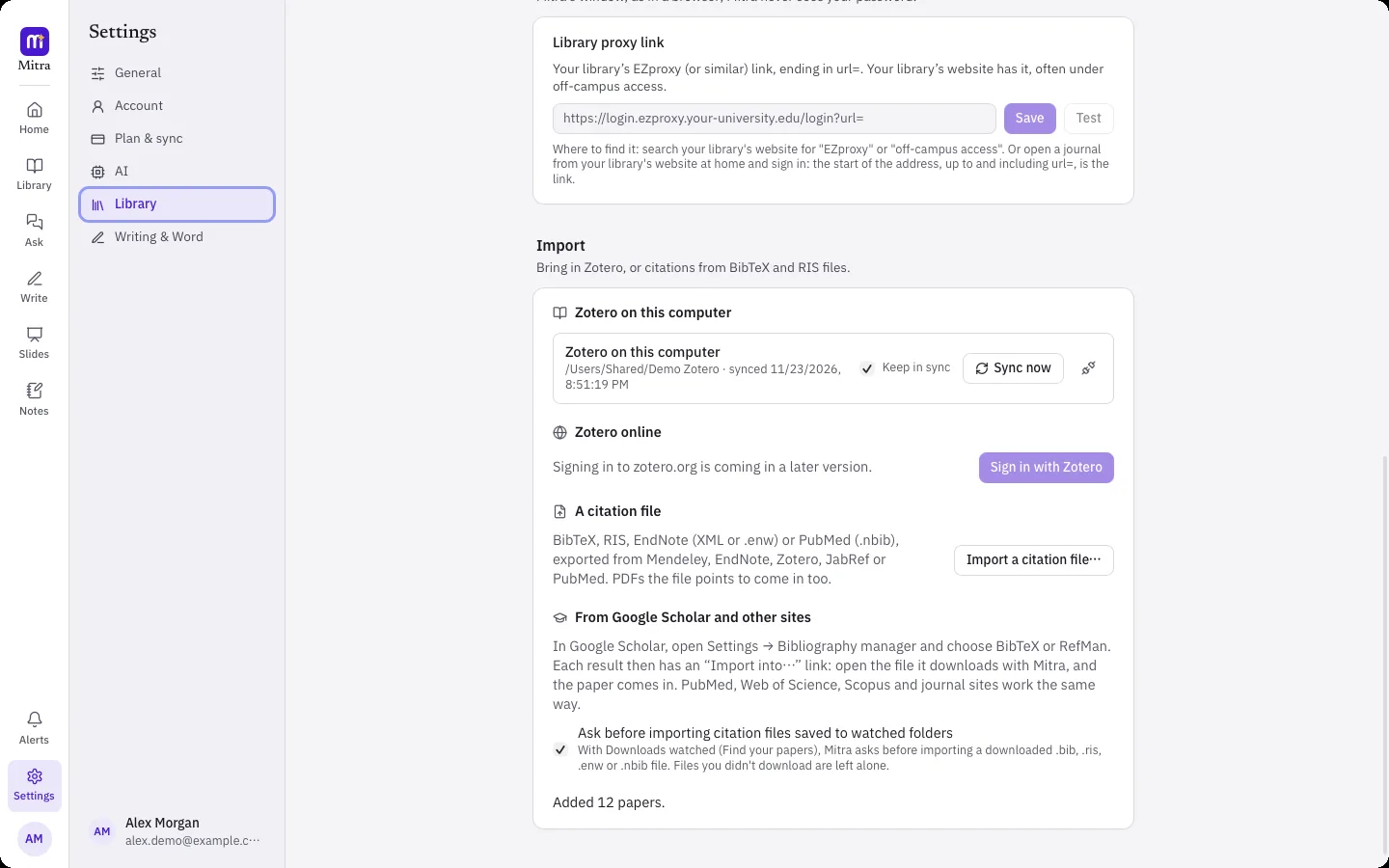
Mitra reads a copy of that. In Settings → Library → Import → Zotero on this computer, or during setup, it brings in your library and group libraries, collections (nested ones become folders), tags, authors, and stored and linked PDFs.
After that it keeps the library in step: save a paper with the Zotero connector, and it shows up in Mitra with a “Added N papers from Zotero” notification. Zotero’s own notes, annotations and trash aren’t imported. Mitra never writes to Zotero, so your Zotero library stays exactly as it was. If Zotero keeps its data somewhere unusual, Choose Zotero’s folder… lets you point Mitra at the folder that holds zotero.sqlite.
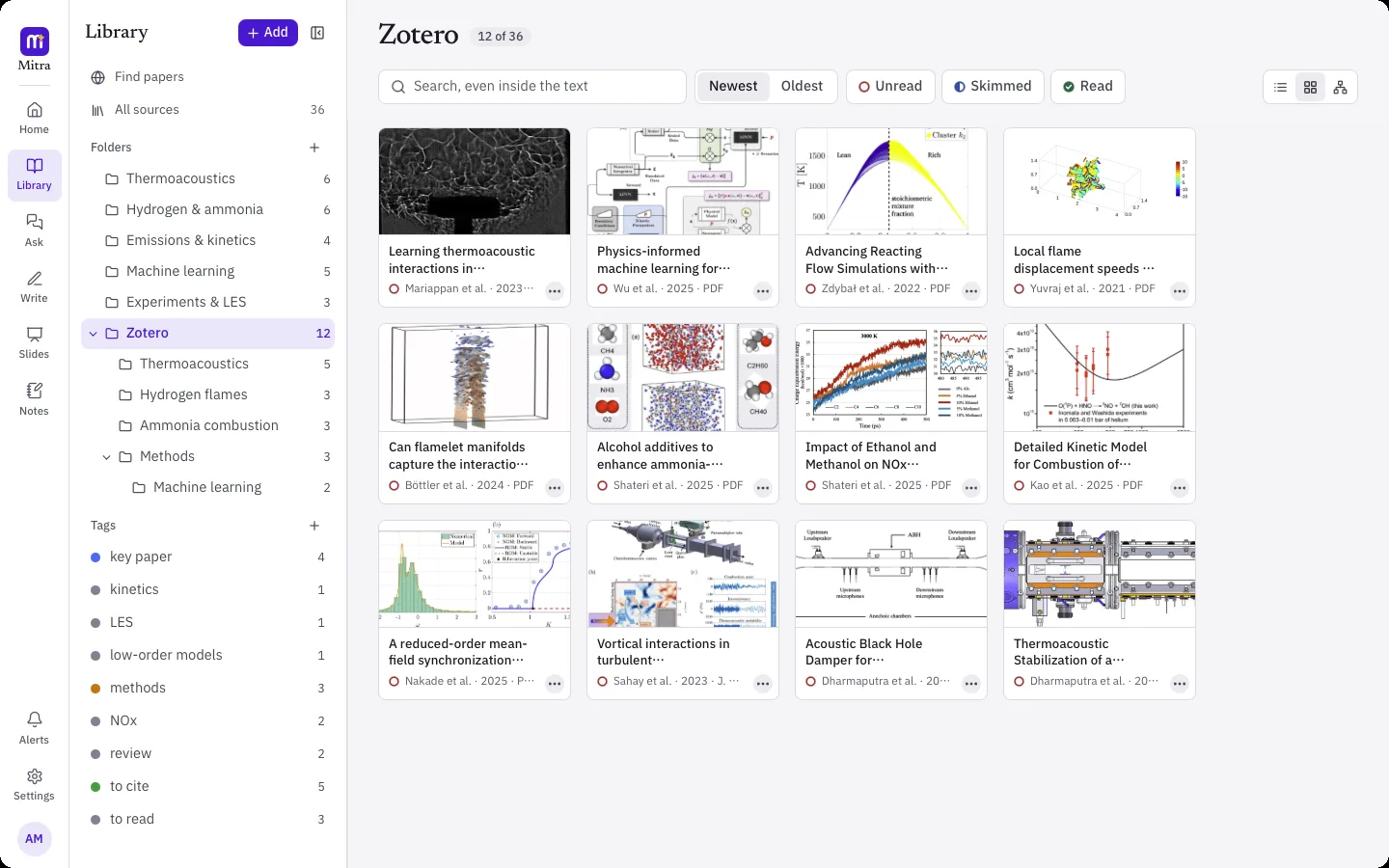
To try it, I made a small demo Zotero library: 12 open-access arXiv papers in four collections (Thermoacoustics, Ammonia combustion, Hydrogen flames, and Methods with a Machine learning collection inside it), with a few tags. I pointed Mitra at its folder with Choose Zotero’s folder….
In the Library, the import shows up as a Zotero folder next to the folders that were already there, with each collection as a folder inside it, the nested one included. Zotero’s tags, such as NOx and low-order models, join the tag list.
Signing in to zotero.org to import an online-only library is coming in a later version; for now, the import reads Zotero on the same computer. You can also export a .bib or .ris from Zotero and import that, which works anywhere.
Asking a collection a question
Once collections are folders, you can scope a question to one of them. In the demo library (24 open-access arXiv papers on gas turbine combustion, organised into folders in Mitra), I set Ask’s scope to the six-paper Thermoacoustics folder and asked: “How do these papers disagree about what drives thermoacoustic instability in swirl combustors?”
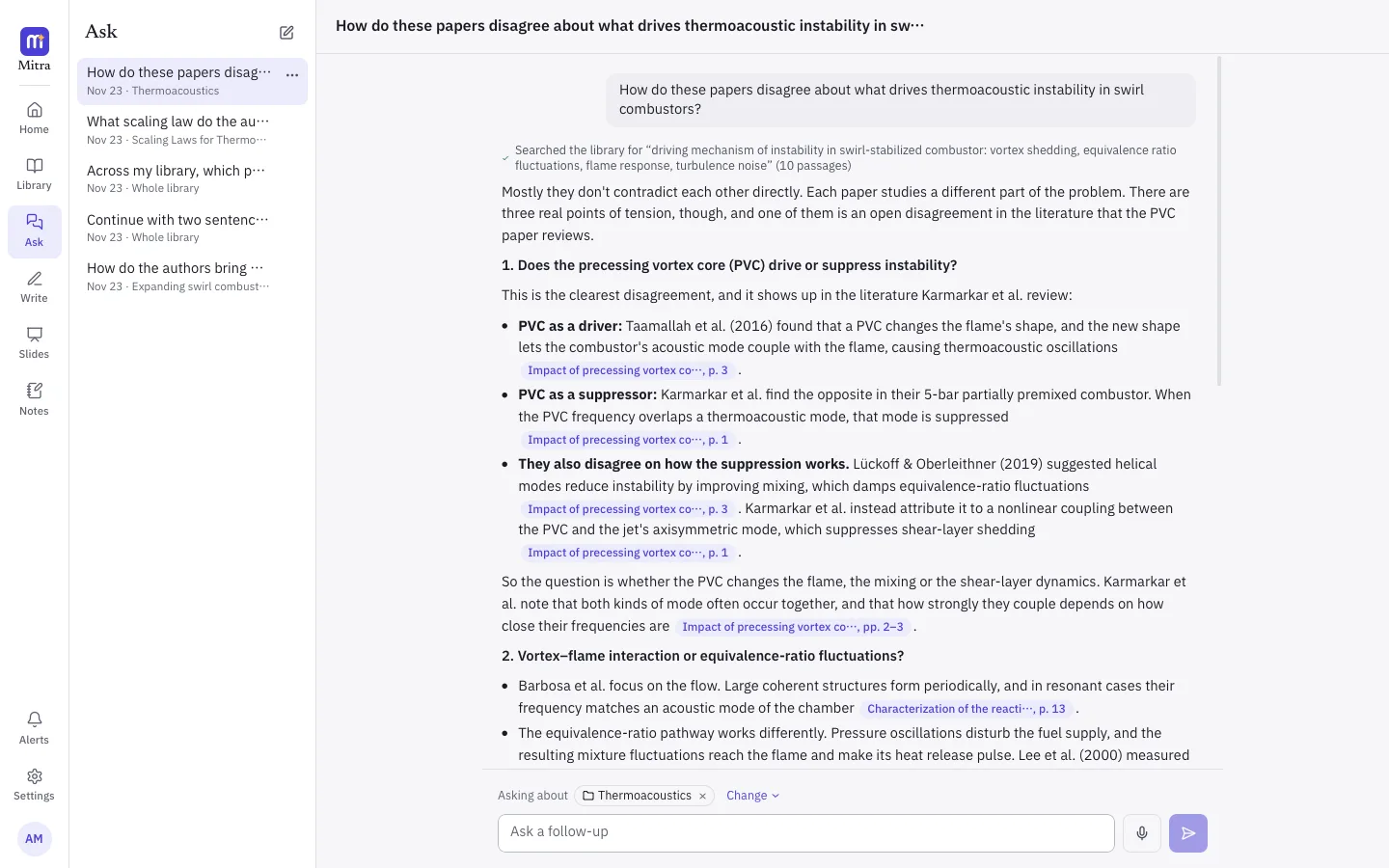
The answer opened with a fair summary: “Mostly they don’t contradict each other directly. Each paper studies a different part of the problem.” Then it found the real tension. The precessing vortex core paper reviews earlier work showing a PVC can drive oscillations by changing the flame’s shape, while its own results show it suppressing a thermoacoustic mode when their frequencies overlap. It added a second point (vortex–flame interaction versus equivalence-ratio fluctuations) from a different paper. Each claim had a chip with the page.
That’s the kind of question a reference manager can’t answer, and the kind you need for the discussion section of a review. The answer isn’t the end of the work. It tells you which pages to read next. If you want to try it on a collection of your own, download Mitra free and import Zotero from Settings → Library.
What the AI sees, and what stays put
The PDFs Mitra copies from Zotero, their text and your notes stay on your computer. When you ask a question, only the passages it needs go to the AI you chose, whether that’s a ChatGPT Plus or Pro sign-in, Claude Code, Codex, Cursor or a model on your own computer (in beta).
Zotero plugins vs a separate AI library
| AI plugin in Zotero | Mitra reading your Zotero library | |
|---|---|---|
| Where you work | Inside Zotero | A separate desktop app; Zotero keeps saving papers |
| Setup | Install the plugin, often an API key or credits | Import once; it stays in step |
| AI | Varies: your own API key, or the plugin’s credits | ChatGPT Plus/Pro, Claude Code, Codex, Cursor or a local model |
| Scope of a question | Varies by plugin | One paper, a folder (from a collection), a tag or the whole library |
| Writing | Zotero’s Word, LibreOffice and Google Docs plugins | Also a Word-style editor and a LaTeX editor citing the library, and a Mitra tab in Word (beta) |
| Reading status | No | Unread, skimmed, read per paper |
| Cost | Plugin-dependent | Free on one computer |
When a plugin is the better choice
If you only want quick summaries of the paper you’re looking at, and you like Zotero’s reader, a plugin is less to learn. Same if your library lives mostly on zotero.org and you work across several computers, since Mitra’s Zotero online sign-in isn’t released yet. And if you collaborate in Zotero group libraries every day, staying inside Zotero keeps everyone in one place.
Related reading
If you’re still choosing a reference manager, Zotero vs Mendeley vs EndNote compares the three, how to move from Mendeley to Zotero covers the switch, and how to manage a BibTeX library helps if you write in LaTeX.
Keep saving papers with Zotero’s connector. That part of your workflow doesn’t need replacing.
Questions people ask
Does Zotero have built-in AI?
No. As of Zotero 10 (released August 2026), Zotero's own announcements and documentation describe no built-in AI assistant. AI features come from third-party plugins or from separate apps that read your Zotero library.
Will importing into Mitra change my Zotero library?
No. Mitra reads your Zotero data folder and copies what it needs. It never writes to Zotero. Zotero's notes, annotations and trash are not imported.
Do I need an API key to use AI with Zotero?
It depends on the tool. Some Zotero plugins need your own OpenAI key; others sell credits. Mitra uses AI you may already have, such as a ChatGPT Plus or Pro sign-in, Claude Code, Codex or Cursor, or a model on your own computer, so there is no API key to manage.
Should I stop using Zotero if I use Mitra?
No need. Zotero's browser connector and Word, LibreOffice and Google Docs plugins are excellent and free. Mitra keeps an imported Zotero library in step as you keep saving papers in Zotero.