
NotebookLM for Research Papers: Limits and a Local Option
If you’re using NotebookLM for research papers, you’ve probably hit the moment where the notebook holds this week’s twenty PDFs but not the two hundred you’ve collected over two years.
Is NotebookLM good for research papers? Yes, for a focused set. You upload papers into a notebook (up to 50 on the free plan, 300 on Google AI Pro, as of November 2026), ask questions, and every answer cites the passages it used. It’s free, it runs in the browser, and its Audio Overviews and study tools are good. It’s weaker when you want to ask across your whole library, keep files on your own computer, or write your thesis in Word or LaTeX from the same place.
One thing first: Google renamed NotebookLM to Gemini Notebook on July 16, 2026. It’s the same product. I’ll call it NotebookLM here because that’s still what most people search for.
How NotebookLM works with papers
You create a notebook and add sources: PDFs, Google Docs and Slides, Word and PowerPoint files, web pages, YouTube videos with captions, audio, pasted text and more (supported sources). Then you chat with them.
Answers “use direct quotes, text, and images from your sources as citations”. Hovering over a citation shows the quote, and clicking it shows the passage in context (citations help). That’s the right design for academic work.
Around the chat there’s a lot more: Audio Overviews (a podcast-style discussion of your sources), Video Overviews, mind maps, flashcards and quizzes, reports, and Deep Research, which searches the web or your Drive and imports what it finds. Notes can be exported to Google Docs.
NotebookLM limits that matter for a literature review
From Google’s Help Center, as of November 23, 2026 (Google marks them “Subject to Change”):
| Plan | Notebooks | Sources per notebook |
|---|---|---|
| Free | 100 | 50 |
| Google AI Plus | 200 | 100 |
| Google AI Pro | 500 | 300 |
| Google AI Ultra | 500 | 500–600 |
Source: NotebookLM plan limits. Each source can be up to 500,000 words or 200 MB, with no page limit, and copy-protected PDFs can’t be added (source limits). Chat and overview usage no longer has fixed daily numbers. Limits are “compute-based” and refresh every five hours up to a weekly cap (usage limits).
Fifty sources is plenty for one paper you’re writing. It’s not enough for a PhD library, so most people end up with one notebook per chapter or topic. That works until your question crosses notebooks, like “which of everything I’ve read measured NOx below 50 ppm?”
Asking a whole library instead of a notebook
This is where a library tool like Mitra differs. Mitra is a desktop app that keeps all your papers on your computer, and Ask can be scoped to one paper, a folder, a tag, a selection, or the whole library.
Here’s a real question I asked the demo library, 24 open-access arXiv papers on gas turbine combustion:
“Across my library, which papers deal with NOx from ammonia or hydrogen flames, and what do they each propose to keep it low?”
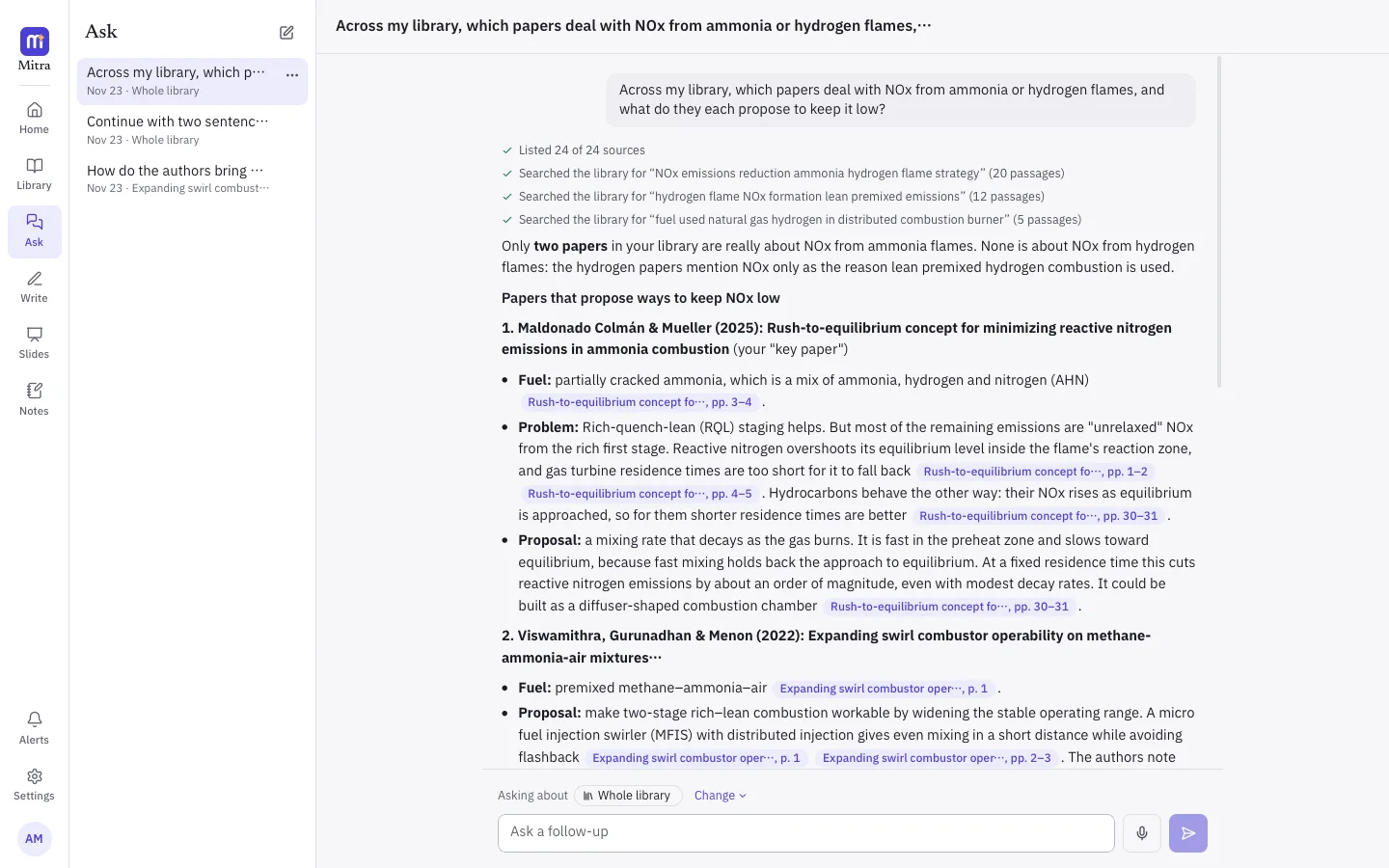
The answer started with a correction worth having: “Only two papers in your library are really about NOx from ammonia flames. None is about NOx from hydrogen flames: the hydrogen papers mention NOx only as the reason lean premixed hydrogen combustion is used.”
It then summarised the two ammonia papers. One proposes a mixing rate that decays as the gas burns, cutting reactive nitrogen emissions by about an order of magnitude at a fixed residence time. The other widens the stable range of a rich-lean combustor with distributed fuel injection. Underneath came a table of the papers that only mention NOx in passing. Every claim had a chip with the paper and page.
Notice what that saves you. If you’re writing “several studies have examined NOx from hydrogen flames”, the answer just told you that your own library doesn’t back that up.
Checking a claim at the page
Clicking a chip opens the PDF at that page, with the start of the cited passage marked. I clicked the chip behind “excess NH₃ forms NH and NH₂, and these consume NO”, which points to page 21 of Viswamithra et al. (2022).
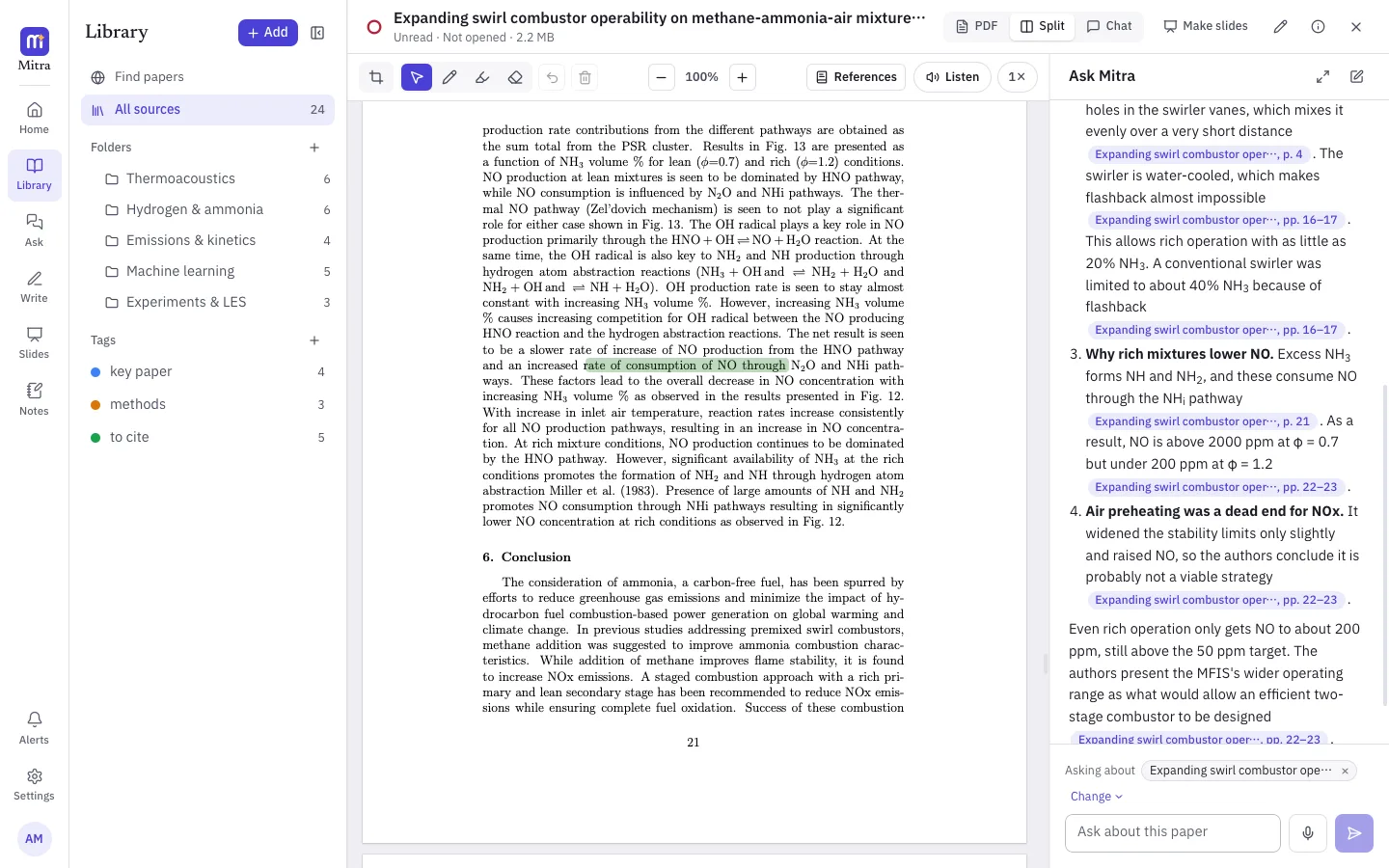
NotebookLM does something similar inside a notebook, and it does it well. The difference is mainly where the PDF lives: on your computer, in a full reader with highlights and notes. You can download Mitra free to try the same question on your own folders.
NotebookLM vs Mitra for research papers
| NotebookLM (Gemini Notebook) | Mitra | |
|---|---|---|
| Unit you ask | A notebook (50–600 sources by plan) | A paper, folder, tag, selection or whole library |
| Where files live | Google’s cloud | Your computer |
| Runs | Browser, plus Android and iOS apps | Desktop app: macOS, Windows, Linux |
| Offline | No (downloaded Audio Overviews play offline) | Library, reader and search yes; AI with a local model (beta) |
| Citations | Quotes from sources, shown in context | Chip to the page with the passage marked; unmatched citations removed and flagged |
| Writing | Notes, export to Google Docs | Word-style and LaTeX editors with citations from your library |
| Reading tracking | No | Unread, skimmed, read per paper |
| Audio and study tools | Audio and Video Overviews, mind maps, flashcards, quizzes | Read aloud, voice chat; flashcards and quizzes in Courses (beta) |
| Cost | Free, higher limits with Google AI plans | Free on one computer with your own AI |
On privacy, Google says personal-account uploads are “not used to train Gemini Notebook unless you provide feedback”, and Workspace and education accounts are never reviewed by people or used for training (privacy help). Mitra’s model is different: PDFs, their text and your notes never leave your computer, and only the passages a question needs go to the AI you picked (ChatGPT, Claude Code, Codex, Cursor or a local model).
When NotebookLM is the better choice
- You’re studying a fixed set of readings. A course pack, a reading group, ten papers for one review. A notebook is the right size, and the study tools are strong.
- You learn by listening. Audio Overviews have no real equivalent in Mitra. Mitra reads papers aloud and does voice chat, but it doesn’t turn sources into a two-host discussion.
- You don’t pay for any AI. NotebookLM is free with a Google account. Mitra is free too, but its AI needs ChatGPT Plus or Pro, a coding CLI plan, or a model you run yourself.
- You work on a phone or a Chromebook. NotebookLM has mobile apps. Mitra’s phone app isn’t in the stores yet.
When a whole-library tool fits better
A library tool earns its place once your papers have outgrown one notebook and your questions start crossing topics. It’s also the safer choice when files can’t go to a cloud service at all, and the more practical one if you want to write the thesis next to the papers, in a real .docx or LaTeX project with citations from the same library.
Using both
Plenty of people will end up with both: NotebookLM for a course pack, a reading group or one paper’s sources, and a library on their own computer for the thesis. The method matters more than the tool, and how to synthesize literature with a matrix works with either. If you’ve been using ChatGPT for the same job, how to use ChatGPT for a literature review covers what to watch for, and how to organize research papers helps before either tool sees your PDFs.
Questions people ask
How many research papers can NotebookLM hold?
As of November 2026, Google's Help Center lists 50 sources per notebook on the free plan, 100 on Google AI Plus, 300 on AI Pro and 500 or 600 on Ultra. Each source can be up to 500,000 words or 200 MB. Google marks these limits as subject to change.
Is NotebookLM the same as Gemini Notebook?
Yes. Google renamed NotebookLM to Gemini Notebook on July 16, 2026 and describes it as the same standalone product. Old NotebookLM links and help pages still work.
Does NotebookLM train on my papers?
Google says uploads from personal accounts are not used to train the product unless you send feedback, and that Workspace and education accounts are not reviewed by people or used for training.
Can I use NotebookLM offline?
No. It runs in the browser and in mobile apps, and needs a connection; only downloaded Audio Overviews play offline. Mitra's library, reader and search work offline, and AI answers can work offline with a model on your own computer (in beta).