
Jenni AI vs Mitra: Which Is Better for a Thesis? (2026)
You’re three chapters in and wondering whether an AI writing tool would get you there faster. Jenni AI and Mitra both say they help with academic writing. They help in very different ways.
Jenni AI vs Mitra, in short: Jenni is a web-based AI writer. It autocompletes your sentences, finds sources from a large academic database and formats citations as you type. Mitra is a desktop research library. It keeps your papers on your own computer, answers questions from them with a citation to the exact page, and checks whether each citation in your draft is supported by a paper you have actually read. Jenni helps you write sentences. Mitra helps you check them against your papers.
What Jenni AI does
Jenni is an AI writing editor that runs in the browser. Its docs say plainly that “Jenni does not have a native app but works fully in mobile browsers” (Jenni docs, as of November 2026).
Its centre is autocomplete. You write, and Jenni suggests the next sentence. Its homepage says those suggestions are “grounded in real papers” and that it searches “248M+ academic sources” (jenni.ai). You can cite an item with one click, which adds the in-text citation and the reference entry together, and it supports over 10,000 citation styles through the Zotero CSL repository (citation docs).
You can also upload PDFs and chat with them, or with your current draft (AI chat docs). There are paraphrasing tools with tones such as academic and persuasive. Libraries from Zotero and Mendeley can be imported, though only one way: later changes in Zotero don’t come across. (If you’re choosing between Jenni and its closest rival, see Jenni AI vs Yomu AI.)
What Mitra does
Mitra starts from the other end. It’s a free desktop app for Mac, Windows and Linux. You put your papers in it (or let it find the PDFs already on your computer, or import Zotero, EndNote, Mendeley, BibTeX or RIS), and they stay on your computer.
Then you can do three things with them:
- Ask questions of one paper, a folder, a tag or the whole library. Every claim in an answer has a chip that opens the PDF at the cited page with the passage marked.
- Write in a Word-style editor or a LaTeX editor, inserting citations from your library. The drafts are real
.docxfiles and LaTeX projects. - Check your citations. Mitra tracks how long you’ve spent reading each paper, and the citation report flags sources you cited but never opened.
Mitra doesn’t come with its own model on the free plan. It uses AI you already have: a ChatGPT Plus or Pro sign-in, Claude Code, Codex or Cursor on your own plan, or a model that runs on your computer.
Jenni AI vs Mitra: comparison table
Jenni’s details below come from its own pricing page and docs, checked on November 23, 2026. Prices change, so check jenni.ai/pricing before you pay.
| Jenni AI | Mitra | |
|---|---|---|
| Where it runs | Web browser, no native app | Desktop app: macOS, Windows, Linux |
| Where your files live | Jenni’s servers (Firebase Firestore and Google Cloud Storage, per its privacy policy) | Your computer. Only the passages a question needs go to the AI you chose |
| Main job | Writing: autocomplete, paraphrase, cite as you type | Your library: reading, asking, writing and checking citations |
| Free plan | 10 AI autocompletes a day, 5 AI requests, 10 PDF uploads | Everything on one computer, with your own AI |
| Paid plans | Plus $12/month, Pro $29/month | Optional: sync and Mitra’s own AI |
| Finding new papers | Searches its academic database as you write | Find papers (OpenAlex) and weekly suggestions from your library |
| Citation styles | 10,000+ | APA by default, about 90 built in, or your own .csl |
| Export | Word, LaTeX (.tex with .bib), BibTeX, RIS |
Drafts are .docx and LaTeX files already; BibTeX, RIS, EndNote XML |
| Knows what you’ve read | Not that I found in its docs | Yes: unread, skimmed, read, per paper |
| Training on your text | Says it doesn’t use your drafts, prompts or outputs to train its models (privacy docs) | Your text isn’t sent to Mitra’s server at all |
Check one thing before you start a long document on Jenni’s free plan. Per its export docs, free-plan exports leave out the reference list. A Word export has no bibliography, and a LaTeX export includes the .bib file but drops \printbibliography.
A worked example: asking a paper before you cite it
Here is the kind of moment where the two tools differ.
Say your chapter needs a sentence about scaling laws for lean hydrogen flames, and you have Gauding, Lehmann et al.’s Scaling Laws for Thermodiffusively Unstable Lean Premixed Turbulent Hydrogen-Air Flames (arXiv, 2026) in your library. You might start typing “The authors propose a scaling law for the turbulent flame speed…” and let a writing tool finish it.
In Mitra I opened the paper and asked the question beside it: “What scaling law do the authors propose for the turbulent flame speed, and over what conditions did they test it?”
The first line of the answer pushed back on the question: “The paper doesn’t give a law for the turbulent flame speed directly. It gives one for the stretch factor I₀.” Then it gave the consumption speed relation, the two models the authors compare, and the fit errors they report for the low-pressure regime (a mean absolute percentage error of 8.61% for one model and 10.72% for the other), each with a page chip.
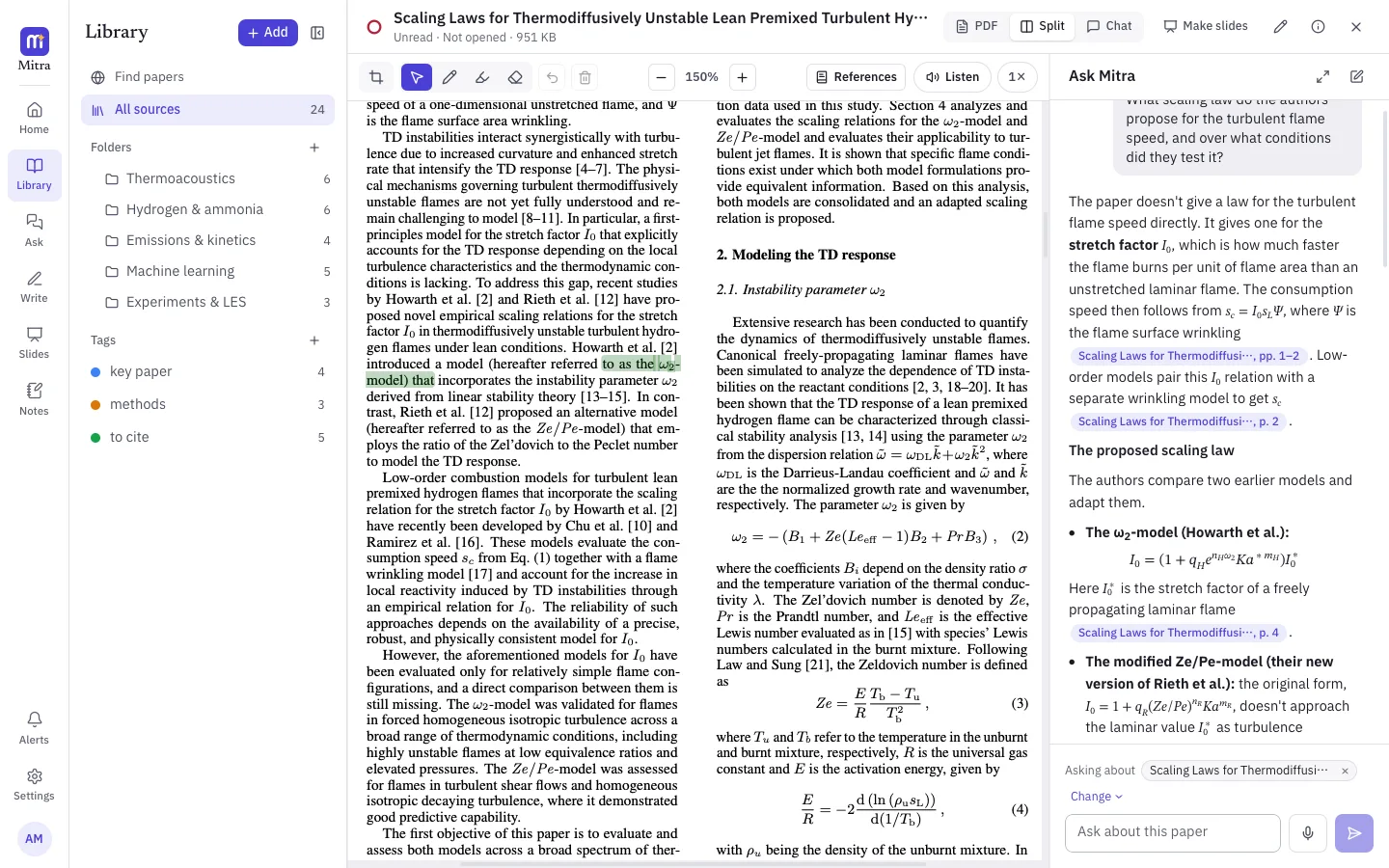
That first sentence matters most. The sentence you were about to type was slightly wrong, and a wrong sentence with a real citation attached is harder to catch than a fake reference. A tool that suggests your next sentence can’t know what you meant to claim. You can download Mitra free and try the same thing on a paper your chapter leans on.
Two limits. The answer is only as good as the text Mitra could pull from the PDF, and extraction can struggle with equations and complex two-column pages. And you still need to read the passage.
Citing papers you haven’t read
Mitra warns you when you insert a citation to a paper you haven’t opened.
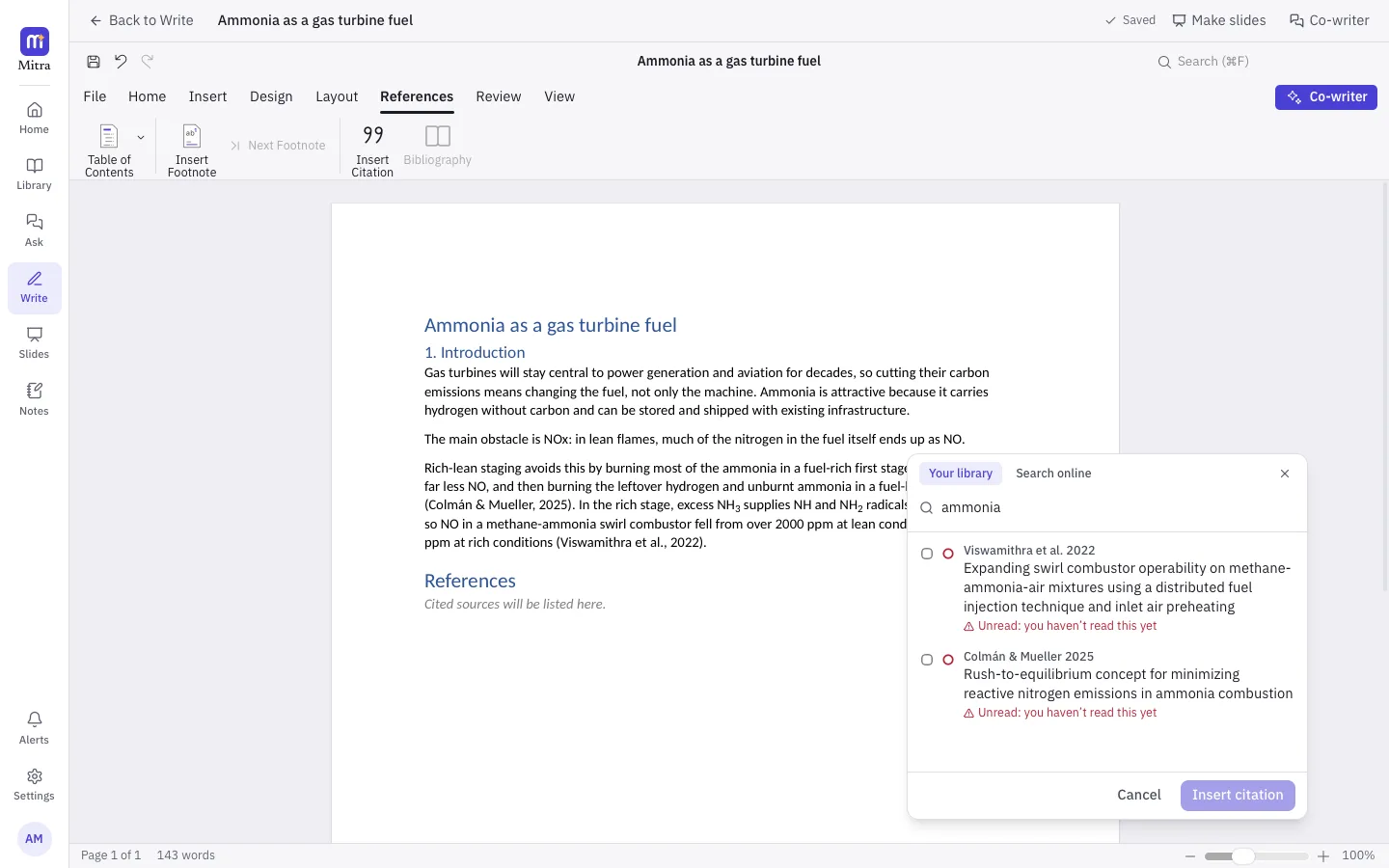
Reading time is counted only while the paper is on screen, the window is focused and you’ve touched the keyboard or mouse in the last 90 seconds. Under 10 minutes counts as skimmed, 10 or more as read. It’s crude, but it’s honest about one thing a writing tool can’t see: whether you’ve looked at the source.
When to choose Jenni AI instead
- You want help producing sentences. Autocomplete is Jenni’s main feature. Mitra’s co-writer can draft a paragraph from sources you pick, but it doesn’t suggest text as you type.
- You need sources you don’t have yet, inside the editor. Jenni searches a large database as you write. Mitra can search for papers online too, but its strength is the papers you already keep.
- You work on a Chromebook, a shared computer or a phone. Jenni runs in any browser. Mitra is a desktop app.
- You need an unusual citation style. Jenni lists more than 10,000. Mitra has about 90 built in, plus any
.cslfile you add.
When Mitra is the better fit
Mitra makes more sense when the sources are the point. A literature review depends on whether you read the papers and represented them fairly, and Mitra is built around that check rather than around producing text.
It also suits work that shouldn’t leave your computer. And it suits people who write in Word or LaTeX, since its drafts are real .docx files and LaTeX projects (TeX Live, Overleaf-compatible). There’s a Mitra tab inside Microsoft Word that cites from your library too; it’s in beta and not yet tested on Windows. If you already pay for ChatGPT Plus or use Claude Code, Mitra uses that.
What it costs
As of November 23, 2026, Jenni’s pricing page lists Free, Plus at $12 a month and Pro at $29 a month. The annual toggle says “Save 60%”, but the page doesn’t show the annual price, so I’ve left it out.
Mitra is free on one computer for good, with your own AI. Paid plans add your library on other devices (Sync, from $4.99 a month) or Mitra’s own AI if you don’t have ChatGPT ($10.99 a month). Paid plans aren’t on sale yet. Note that the free ChatGPT plan doesn’t work as Mitra’s AI; it needs Plus or Pro, or one of the other options.
Can you use both?
Yes, and for some people that’s the sensible answer. Jenni exports BibTeX and RIS, and Mitra imports both, so a library can move either way. If you’re unsure what your university allows, can you use AI to write your thesis covers the usual rules, and how to check if a citation is real covers checks that work with any tool, including the habits that stop fake citations in the first place.
What I wouldn’t do is let any tool, Mitra included, write a claim you haven’t checked against the paper.
Questions people ask
Is Jenni AI free?
Jenni has a free plan. As of November 2026 its pricing page lists 10 AI autocompletes a day, 5 AI requests and 10 PDF uploads on Free, with Plus at $12 a month and Pro at $29 a month. On the free plan, exports leave out the reference list.
Does Mitra write my thesis for me?
No. Mitra's co-writer drafts and edits from the papers in your library, and every edit arrives as a suggestion you accept or reject. It is built to help you write and check your own thesis, not to produce one for you.
Can I use Jenni AI and Mitra together?
Yes. Jenni exports BibTeX and RIS, and Mitra imports both. Some people draft in a web editor and keep their papers, reading and citation checks in a desktop library. The two do different jobs.
Does Mitra work offline?
The library, reader, search, both editors and LaTeX compiling work offline with no AI. For AI answers offline, you can run a downloaded model on your own computer (that option is in beta).