
Jenni AI vs Yomu AI: An Honest Comparison for 2026
Jenni AI and Yomu AI look almost identical from the outside: a web editor, an AI that finishes your sentences, a button that adds a citation. The differences are in the free plan, the citations, what you can export, and how each one handles the AI-detection question.
Jenni AI vs Yomu AI, the short answer: Jenni is the more transparent and more complete choice for thesis writing. It publishes its free-plan limits, supports over 10,000 citation styles, and exports to Word and LaTeX. Yomu is cheaper on yearly billing ($10 a month for Pro against Jenni’s $12), offers a choice of AI models, and advertises a plagiarism checker. Neither keeps your papers on your own computer, and neither checks whether you’ve read what you cite.
Everything below comes from each company’s own site and docs, checked on November 23, 2026.
Side-by-side comparison
| Jenni AI | Yomu AI | |
|---|---|---|
| Paid plans | Plus $12/month, Pro $29/month | Pro $10/month, Ultra $17/month (yearly billing) |
| Yearly billing | “Save 60%” (price not shown) | $120 and $204 a year |
| Free plan | 10 autocompletes a day, 5 AI requests, 10 PDFs | “Start for free”; limits not published |
| Usage on paid plans | Plus: 5,000 autocompletes and 500 AI requests a month. Pro: unlimited | Pro: 1,000 AI actions a month. Ultra: unlimited |
| Autocomplete | Yes, “grounded in real papers” | Yes, accept with Tab |
| Source search | “248M+ academic sources” incl. Semantic Scholar, PubMed, arXiv, Crossref | Sourcely, plus academic and web search |
| Citation styles | 10,000+ (Zotero CSL repository) | 700+ |
| Chat with PDFs | Yes | Yes, PDFs and images |
| Plagiarism checker | Not described in its docs | Advertised on homepage |
| Imports | Word; one-way from Zotero and Mendeley | Word (.docx) |
| Export | Word, LaTeX (.tex + .bib), BibTeX, RIS | Not stated for the main editor |
| Apps | Browser only, works in mobile browsers | Browser |
| Trains on your writing | No, per its docs | No, per its FAQ |
Sources: Jenni pricing, Jenni plans and billing, Jenni export docs, Jenni citation docs, jenni.ai; Yomu pricing, yomu.ai.
Price: closer than it looks
Yomu’s headline numbers are lower, but they’re yearly-billing rates. You pay $120 up front for Pro or $204 for Ultra. Jenni’s $12 and $29 are shown as monthly, and its annual toggle promises 60% off without printing the figure. If you only need help for one semester, compare the monthly-billed prices at checkout before deciding. I couldn’t see Yomu’s.
Usage caps differ in shape. Jenni counts autocompletes and AI requests separately (Plus gives 5,000 and 500 a month). Yomu pools everything into “AI actions”, which its FAQ says cover paraphrasing, citing, autocomplete and chat. Pro gets 1,000 a month. Yomu also notes that its default chat model and document editing don’t use credits.
Neither lists a student discount. Jenni mentions automatic regional pricing at checkout.
The free plan
This is the clearest difference. Jenni’s pricing page spells out the free tier: 10 AI autocompletes a day, 5 AI requests, 10 PDF uploads of up to 150 pages, and unlimited citations. Its docs add that the free chat and edit allowances are one-time, not monthly. One catch for thesis writers: free-plan exports leave out the reference list.
Yomu’s FAQ says “you can start using Yomu for free to try the service”, and its site mentions a free trial with no credit card. I couldn’t find the limits written anywhere. Try it on a real chapter for a day before you plan around it.
Citations and sources
Both tools search for sources as you write and format the citation for you. Jenni’s database is larger by its own count, and its 10,000+ styles come from the same CSL repository Zotero uses, so obscure journal styles are likely covered. Yomu’s 700+ styles will cover most people.
Jenni also has “Reviews”, which check claims against your library and against Crossref, PubMed and OpenAlex. I found that only on a product page, not in the docs, so treat it as lightly verified.
Both share a limit that matters more than either feature. A tool that finds a source for a sentence you’ve already written is matching text to text. It can’t tell you whether the paper actually supports your claim in context, or whether you’ve read it. That’s still your job.
Writing, export and LaTeX
Jenni exports to Word and to LaTeX (a .tex with its .bib in a ZIP), and your references to BibTeX or RIS (export docs). If your thesis is in LaTeX, that matters a lot. Yomu imports Word files, but its site doesn’t say how you get a finished document out of the main editor, and it doesn’t mention LaTeX.
Both run only in the browser. Neither offers a Word or Google Docs add-in that I could find.
AI detection and “humanizing”
The two companies take visibly different positions. Jenni’s whitepaper argues that “the detection paradigm has failed” and promotes making AI help visible instead. Yomu’s site offers a free “Academic Tone Humanizer”, which it describes as “for natural academic voice—not for bypassing integrity policies”. It also mentions an AI detection tool, and its ethics statement says it doesn’t condone using it to get around academic integrity rules.
Whichever you use, the safe route is to follow your university’s AI policy and disclose AI help where it asks you to. Can you use AI to write your thesis covers what’s usually allowed.
Testing both before you pay
Take one real section of your thesis, about 500 words with five citations, and run the same three jobs in each tool: continue a paragraph, find a source for a sentence that has none, and export the result to the format your thesis uses. Then open every source each tool suggested and check that it says what the sentence claims.
Count the corrections. The tool that needed fewer is the one to pay for. Keep an eye on how many free actions the test used, too: Jenni’s five free AI requests go quickly.
Who should choose which
Choose Jenni if you write in LaTeX, need an unusual citation style, want to know exactly what the free plan gives you, or are importing a Zotero or Mendeley library.
Choose Yomu if you want the lower yearly price, a plagiarism check in the same tool, or a choice of AI models.
A third option: start from your library, not the editor
Both tools start from the text and look for sources to fit it. If your problem runs the other way (150 PDFs you need to write about correctly), a library-first tool fits better. Mitra is one: a free desktop app that keeps your papers on your computer, answers from them with page citations, and marks each paper by whether you’ve read it.
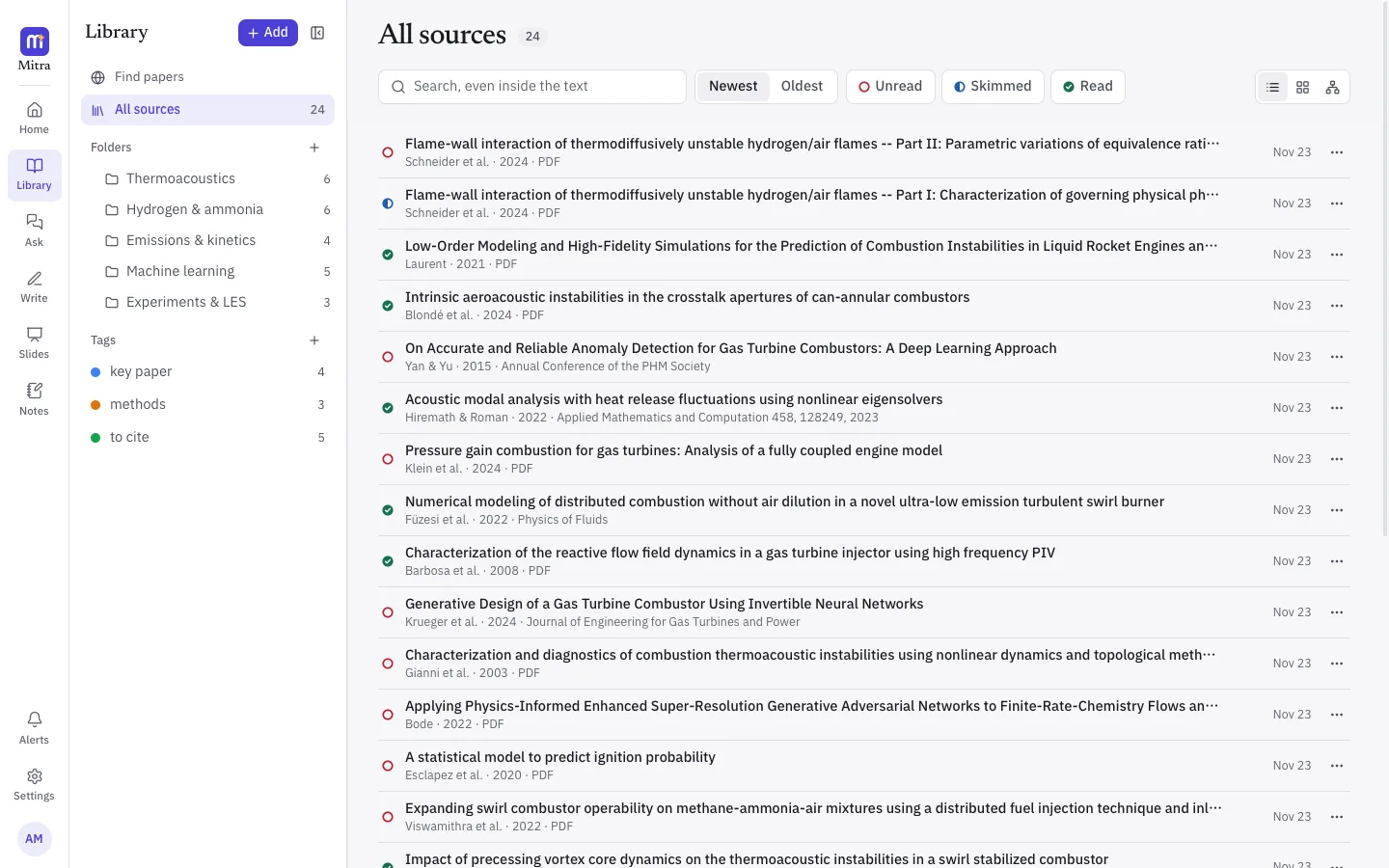
It doesn’t autocomplete and has no plagiarism checker, so it doesn’t replace either tool for those jobs. I compared it with each separately in Jenni AI vs Mitra and Yomu AI vs Mitra, or you can download Mitra free and filter your own library by Unread.
Whichever editor you choose, the checks in how to check if a citation is real still apply to every reference it hands you.
Questions people ask
Is Jenni AI or Yomu AI cheaper?
It depends on billing. As of November 23, 2026, Jenni lists Plus at $12 a month and Pro at $29 a month. Yomu shows Pro at $10 a month and Ultra at $17 a month on yearly billing ($120 and $204 a year). Yomu's monthly-billed prices were not visible on its page.
Which has the better free plan?
Jenni publishes its free limits: 10 AI autocompletes a day, 5 AI requests and 10 PDF uploads, with unlimited citations. Yomu says you can start for free but does not list the free limits on its site.
Can Jenni AI or Yomu AI export to LaTeX?
Jenni exports a .tex file with a .bib in a ZIP, according to its docs. Yomu's site does not mention LaTeX.
Do Jenni AI and Yomu AI train on my writing?
Both say no. Jenni's docs say it does not use your drafts, prompts or outputs to train its models, and Yomu's FAQ says it does not train on your data.