
Yomu AI vs Mitra: Academic Writing Assistants Compared
A paragraph with two correct-looking citations can still be built on papers you never opened. Which AI tool you pick decides whether anyone notices.
Yomu AI vs Mitra: Yomu is a web-based AI writing editor with autocomplete, paraphrasing, a citation tool that searches for sources, PDF chat and a plagiarism checker. Mitra is a free desktop research library: your papers stay on your computer, you ask questions of them with page citations, and a citation report checks each sentence you cite against the paper and your reading history.
Short version: Yomu works on the text. Mitra works on the link between the text and the papers.
What Yomu AI does
Yomu runs in the browser at app.yomu.ai. Its homepage describes “an AI autocomplete that completes your sentences and paragraphs”, accepted with the Tab key, and a citation tool that can “find, include, and format citations in 700+ citation styles”, powered by Sourcely, a source-search product from the same team (yomu.ai, as of November 2026).
Beyond that, it can paraphrase, expand, shorten and summarize a selection, turn bullet points into prose, chat with PDFs and images, and check your text for plagiarism. You can import a Word document. Yomu says it doesn’t train its models on your data (pricing page FAQ).
What Mitra does
Mitra is a desktop app for Mac, Windows and Linux. Your PDFs, notes, highlights and drafts stay on your computer and are never uploaded to Mitra’s server.
It has a Word-style editor and a LaTeX editor, and both cite from your library. Citations render in a CSL style (APA by default, about 90 built in), and the bibliography updates itself, much as it would with a reference manager in Word. The co-writer can draft or edit from your sources, and its edits arrive as tracked suggestions you accept or reject.
What it adds that a writing editor doesn’t have is memory of your reading. Mitra counts the minutes you’ve actually spent with each paper, and the citation report uses that.
Yomu AI vs Mitra at a glance
Yomu’s facts come from yomu.ai, checked on November 23, 2026.
| Yomu AI | Mitra | |
|---|---|---|
| Where it runs | Web browser | Desktop app (macOS, Windows, Linux) |
| Where your documents live | Yomu’s servers | Your computer |
| Autocomplete as you type | Yes | No |
| Finds new sources while you write | Yes, through Sourcely and academic and web search | Yes, Find papers and Cite online search OpenAlex |
| Chat with your PDFs | Yes | Yes, one paper, a folder, a tag or the whole library, with page citations |
| Plagiarism checker | Advertised on its homepage | No |
| Checks each citation against the paper | Not that I found on its site | Yes, citation check and citation report (beta) |
| Knows which papers you’ve read | Not that I found | Yes |
| Citation styles | 700+ | About 90, plus any .csl file |
| LaTeX | Not mentioned on its site | Full LaTeX editor with TeX Live |
| Price | Pro $10/month, Ultra $17/month (yearly billing) | Free on one computer with your own AI |
A worked example: one paragraph, two citations
Here’s a short demo draft in Mitra’s Word-style editor, the start of an introduction on ammonia as a gas turbine fuel. Its third paragraph makes two claims and cites two papers from the demo library:
Rich-lean staging avoids this by burning most of the ammonia in a fuel-rich first stage, which produces far less NO, and then burning the leftover hydrogen and unburnt ammonia in a fuel-lean second stage (Colmán & Mueller, 2025). In the rich stage, excess NH₃ supplies NH and NH₂ radicals that consume NO, so NO in a methane-ammonia swirl combustor fell from over 2000 ppm at lean conditions to under 200 ppm at rich conditions (Viswamithra et al., 2022).
Both papers are real, both citations are formatted correctly, and the numbers are right, so a plagiarism checker and a citation formatter would both pass it.
Then I opened Review → AI use and citations.
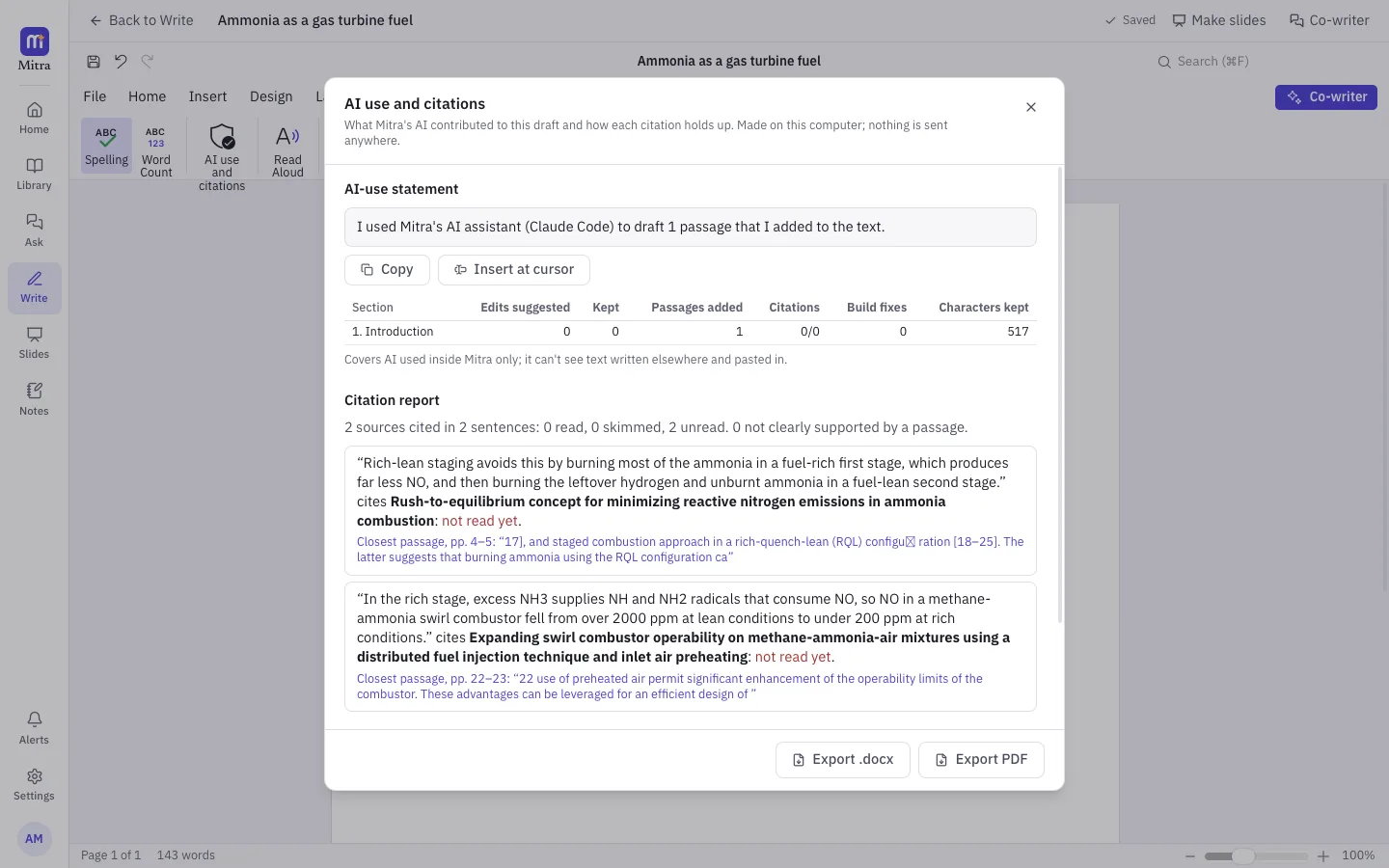
The report’s summary line reads “2 sources cited in 2 sentences: 0 read, 0 skimmed, 2 unread. 0 not clearly supported by a passage.” Under each sentence it shows the closest passage it found in the paper, with the page (pp. 4–5 for the first, pp. 22–23 for the second), and a click opens the PDF there.
So the claims aren’t flagged as unsupported, but both papers are marked as never opened. In this demo that’s true. The passage was drafted with Mitra’s AI (the statement above the report says so), and neither paper had been opened. The fix takes ten minutes: open each paper at the cited page, read the section, and confirm the sentence says what the authors said.
Above the report, Mitra also writes a one-line AI-use statement from its own log, which you can use or ignore.
The citation report runs on your computer with no AI and nothing sent anywhere. It’s labelled beta in Mitra’s feature list because it hasn’t been tried by hand on many real theses yet, so read its flags as prompts to check, not as a grade.
When to choose Yomu AI instead
- You want autocomplete. If the blank page is your problem, Yomu’s sentence completion is the feature you’re after, and Mitra doesn’t offer it.
- You want a plagiarism check before you submit. Yomu advertises one. Mitra doesn’t have one. Your university may also give you Turnitin or a similar tool for free.
- You need a citation style that’s hard to find. Yomu lists 700+.
- You switch computers a lot or work from a library PC. A web app is easier there.
When Mitra is the better fit
Mitra fits when you’re writing from a pile of papers you’ve already collected, for a literature review, thesis or paper, and you want every answer and citation to trace back to a page. It’s also the one to pick if you write in LaTeX: it has a LaTeX editor with TeX Live, Overleaf .zip import and a PDF preview, which Yomu’s site doesn’t mention.
Where your files sit can decide it on its own. Some ethics approvals and data agreements don’t allow research material on third-party AI services, and Mitra keeps documents on your computer, sending only the passages a question needs to the AI you choose. You can also run a model on your own computer; that option is in beta.
Prices, as of November 2026
Yomu’s pricing page shows Pro at $10 a month and Ultra at $17 a month, billed yearly at $120 and $204. Pro includes 1,000 AI actions a month; Ultra is unlimited. The page also offers monthly and quarterly billing, but I couldn’t see those prices, so I’ve left them out. Yomu’s FAQ says you can start for free, but I couldn’t find the free limits written down.
Mitra is free on one computer, using ChatGPT Plus or Pro, Claude Code, Codex, Cursor or a local model as its AI. You can download it here and open an existing .docx in the Write space to run the citation report on it.
Whichever tool you draft in
Before a chapter goes to your supervisor, open each cited paper at the page you’re relying on and read the section around it. It takes about ten minutes a paper, and it’s the check no formatter, plagiarism scanner or autocomplete does for you. How to avoid plagiarism in a thesis covers the paraphrasing side, and Jenni AI vs Mitra compares the other big name in this space. If you haven’t checked what your university allows for AI help, do that first.
Questions people ask
How much does Yomu AI cost?
As of November 23, 2026, yomu.ai/pricing shows two paid plans: Pro at $10 a month ($120 billed yearly) with 1,000 AI actions a month, and Ultra at $17 a month ($204 billed yearly) with unlimited AI actions. Yomu says you can start for free; the free limits are not listed on the page.
Does Yomu AI have a plagiarism checker?
Yomu's homepage advertises a plagiarism checker. Mitra does not have one. Mitra checks something different: whether each citation in your draft is supported by a passage in the paper you cited, and whether you opened that paper.
Is Mitra's citation report finished?
It is built and works on the computer with no AI, but it is labelled beta: it has not yet been tried by hand on many real theses. Treat what it flags as a list of things to check, not a verdict.
Can I write in Microsoft Word with Mitra?
Yes, two ways. Mitra's own Word-style editor saves real .docx files, and a Mitra tab inside Microsoft Word inserts citations from your library. The Word tab is in beta and has not yet been tried on Windows.